Everything a live show needs. One window.
From the first camera to the final stream — inputs, switcher, presentation, audio, overlays and outputs are designed together, so nothing has to be bolted on. Now with Scripture Listen, scenes you design and a 36-input grid.
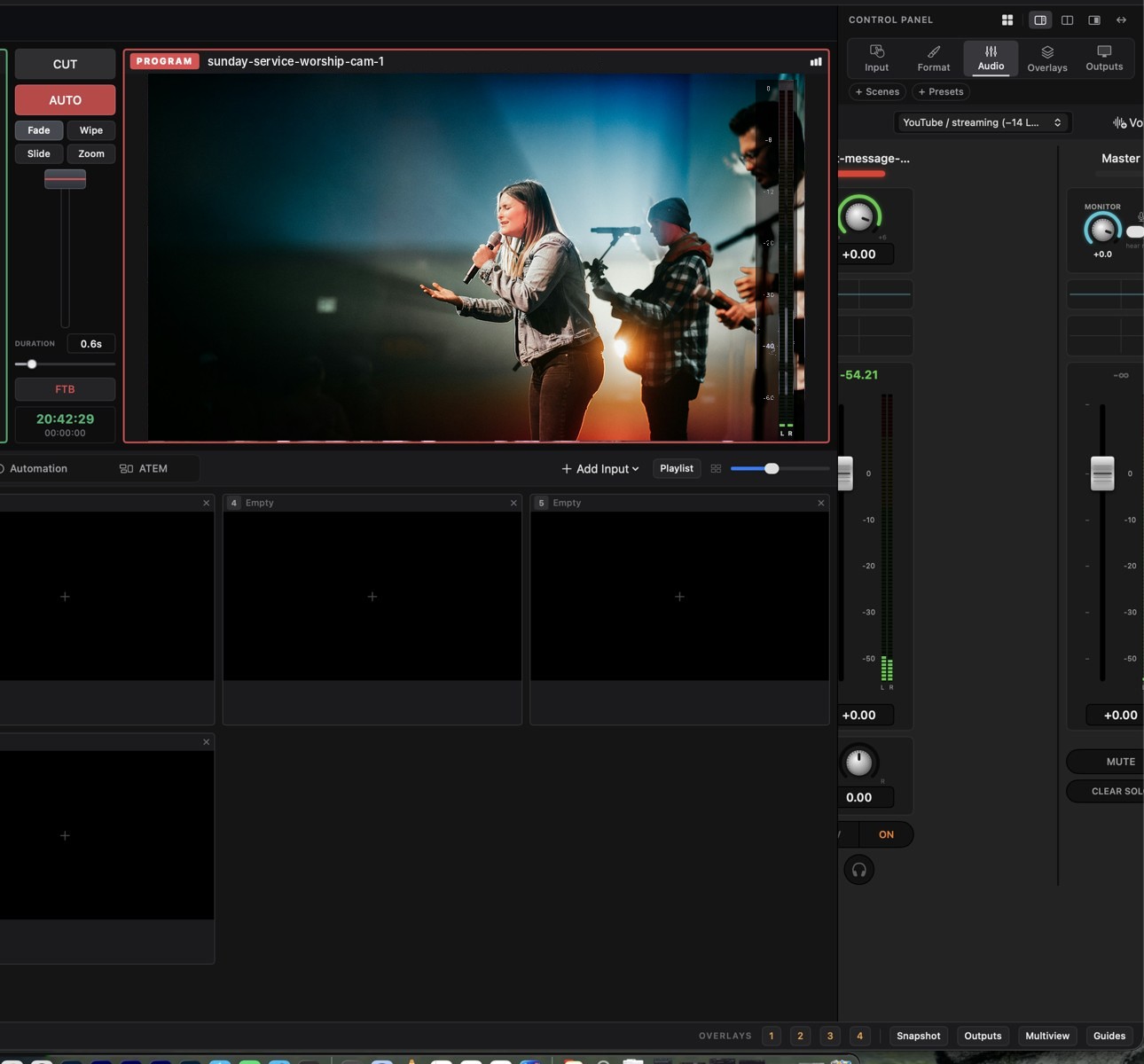
Preview. Program. Take.
The switcher is the heart of LiveDeck: two monitors, a bus of inputs, and the same muscle memory as a hardware panel.
- Inputs: cameras, capture cards (Blackmagic DeckLink, USB), iPhone Continuity Camera, video files, images, playlists, web pages, NDI® sources, Zoom, sound pads, colour and test pattern
- Screen capture: a whole display, one app window (even when it is covered) or a rectangle you drag on the screen
- Web video: YouTube, Vimeo, Pexels, Pixabay, Internet Archive and Wikimedia Commons, with play, seek, loop and speed controls
- Take: CUT, or AUTO with fade, wipe, slide and zoom; T-bar for manual mixes; fade to black
- Keys: lyrics, lower thirds and PiP over Preview or Program; scenes for repeatable layouts; multiview to see everything at once
- Control: hardware-style buttons, customisable keyboard shortcuts, ATEM tally and switching over the network; drag input tiles to reorder them
- Auto Mix: timed switching, or follow the voice — LiveDeck cuts to whoever is speaking, with a wide shot when several people talk
Words on screen before the verse ends.
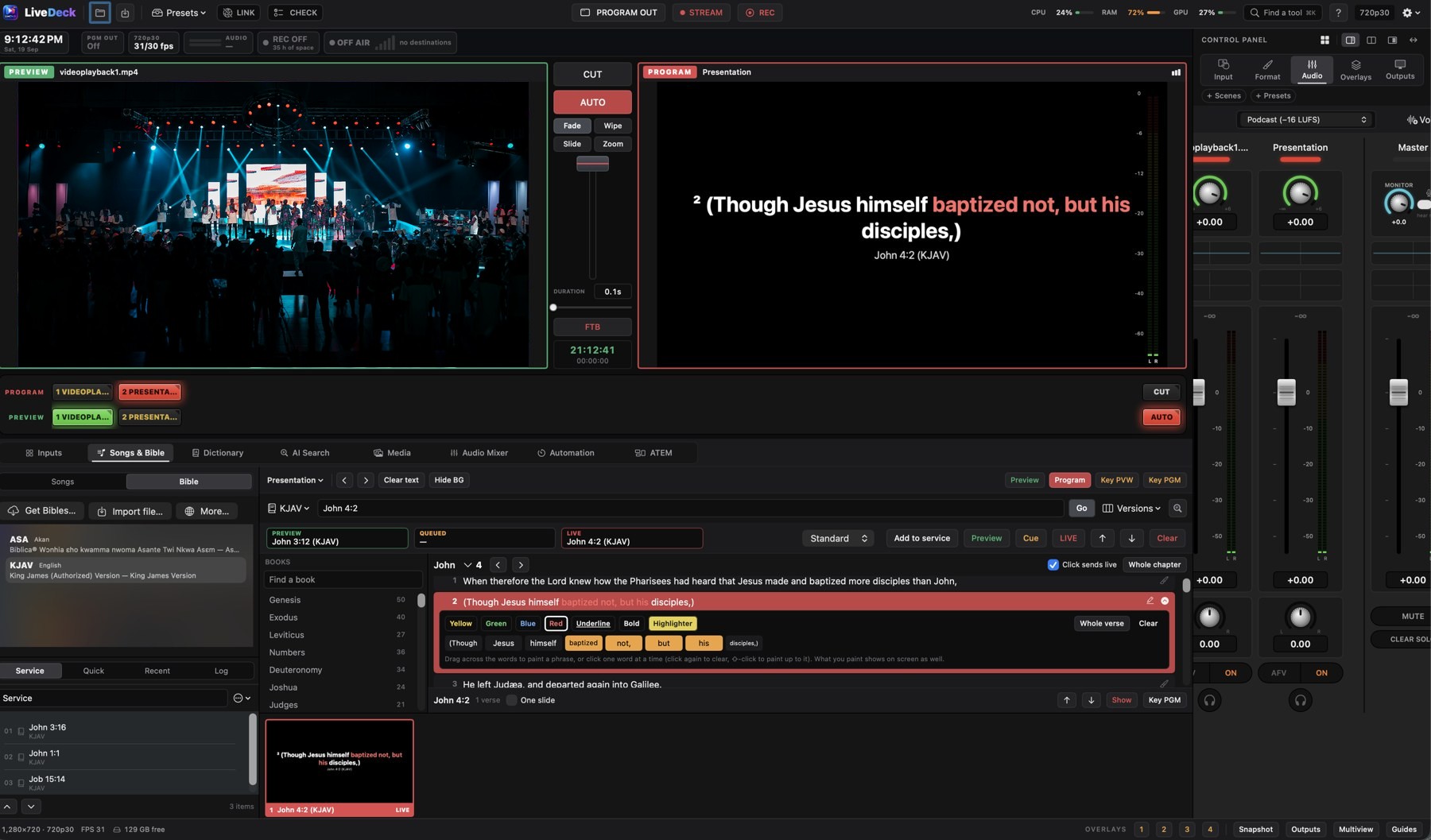
Presentation is built into the switcher, not a second app. Every slide is one click from Preview or Program.
- Reference typing that finishes your thought: type “jo 3” and it becomes John 3; hints show “chapter 3 of 21 · 36 verses” and flag a verse that does not exist
- Highlight as you preach: drag across words to paint a phrase in yellow, green, blue, red, underline or bold — on screen, in the recording and on the stream
- Service plan, quick scriptures, recents and log; the selected scripture is previewed as the slide it will become, with Preview and LIVE buttons
- Songs: library with import (ProPresenter, OpenLyrics, text), online lyrics search, slide formatting, service order
- Dictionary slides and AI-assisted slide text with the provider and key of your choice
- Looks: backgrounds (colour, image, video, library), text styles, lower-third or full-screen layouts — save and reuse
- 2,500+ Bible versions in 200+ languages through API.Bible, or import Zefania/OSIS/Beblia/OpenSong XML, USFM, CSV or JSON files you are licensed to use
- Display modes: Standard, Church, Crusade (very large outlined text) and Stream — and an offline dictionary of 147,478 English words with autocorrect
The preacher says the reference. The verse is ready.
Choose a microphone and LiveDeck listens. A spoken reference — “John chapter three verse sixteen”, “first Corinthians thirteen four” — or a verse read aloud is found across every installed Bible version and offered as a chip. One click, or automatically in Open the verse mode, and it is on the screen.
References and quotes
Works with spoken references and with the words themselves — even a phrase of four words or more finds its verse.
Never a wrong verse on air
Uncertain matches are marked and are never opened on their own. The operator stays in charge.
Runs on the computer
Recognition happens on the machine — on-device on the Mac for supported languages, the built-in offline engine on Windows. LiveDeck does not upload audio.
Scenes you design, up to 36 inputs.
Side-by-side, quad, picture-in-picture and grids of 2 to 36 inputs — every cell stays 16:9, and above nine inputs sources are rendered at cell size to keep the frame rate up.
Your own look
Gutters between the windows, a colour, picture or looping video behind them, borders and rounded corners — and windows you drag and resize anywhere.
A scene as an input
Keep Program on one camera while the scene waits on Preview, or send it straight to a display, NDI® or another station.
Room to work
Drag the dividers between monitors, switcher, deck and control panel; fold panels away; sizes are remembered per window size, even in full screen.
One button to go live. One to record.
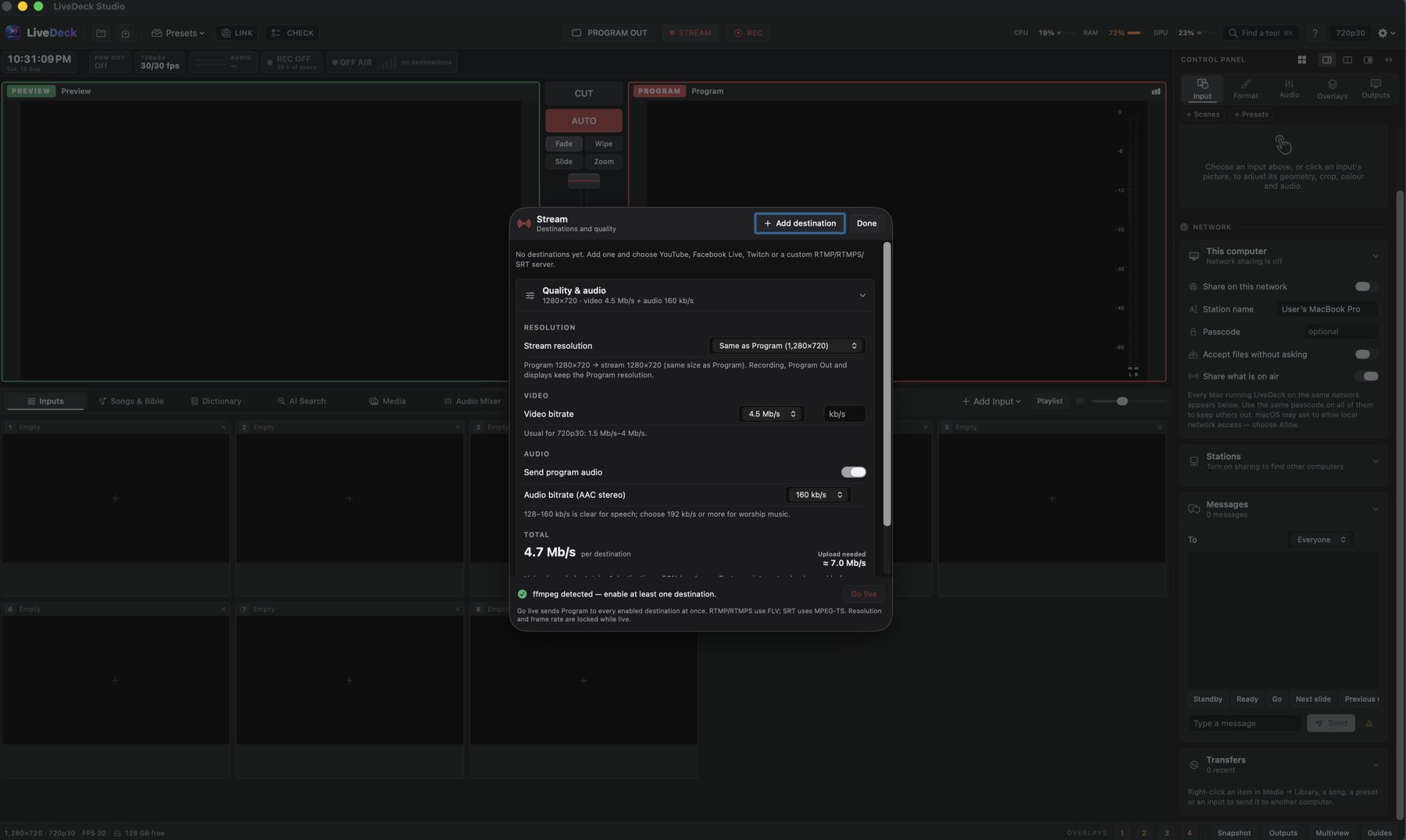
Stream the Program mix to several destinations at once and keep a clean local master, without leaving the window.
- Destinations: YouTube, Facebook Live, Twitch and any RTMP, RTMPS or SRT server, all enabled at once
- Instagram Live: a portrait 9:16 version (crop centre or fit) streams alongside landscape YouTube or Facebook from the same Program
- Quality: separate stream resolution, video bitrate and AAC audio bitrate; upload estimate before you go live
- Recording: H.264, HEVC or ProRes; press M for chapter markers; record each microphone to its own WAV track; export podcast audio (.m4a)
- Formats: progressive and interlaced, 720p to 4K, 24–60 fps
- Reliability: automatic reconnect, dropped-frame counter, on-air status bar with signal strength and time on air
Projector, LED wall, stage, network.
Program goes wherever the room needs it, each output with its own geometry.
External displays
Borderless full-screen outputs for projectors and LED walls, custom areas for LED processors, letterbox / crop / squeeze, edge crop and output resolution.
NDI® in and out
Send Program over NDI® to OBS, vMix, TriCaster or Studio Monitor; receive NDI® sources as inputs, with a low-bandwidth option.
Stage display
Clock, countdown, messages and the words on screen now and next — on its own screen, or as a normal input you can send to any display, NDI® or another station.
Program Out
Clean Program feed on a second display or capture device, with or without overlays.
LiveDeck Camera
A virtual camera that puts Program into Zoom, Microsoft Teams, Google Meet or FaceTime.
Multiview
See every input, Preview and Program on one monitor for the operator or the control room.
A mixer, not an afterthought.
Every input has a channel; the Program mix feeds recording, streaming and NDI® together.
- Per-channel gain, EQ, compressor, gate and meters
- Loudness targets (YouTube, podcast −16 LUFS) and a master limiter
- Monitor bus with headphone solo; audio-follow-video (AFV) per input
- Use any microphone, audio interface or mixer as an input
- Podcast voice in one click: low-cut, gentle gate, presence and compression on every microphone
- Sound pads: eight pads for jingles, intros and stingers, each with its own volume, loop, colour and shortcut
Lower thirds, tickers, countdowns — designed in the app.
Four overlay slots sit on the status bar so any operator can fire them. Overlays also work as standalone inputs with transparent backgrounds.
- Template library: 68 designs in eleven categories — use one as it is, or duplicate and edit; share your own with other stations, Mac or Windows
- Graphics editor: text, shapes, images, gradients and looping videos with in/out animations (fade, slide, wipe, scale, blur, typewriter); export posters as PNG/JPG or MP4
- Preview before Program: arm an overlay on Preview, then CUT or AUTO takes it on air together with the picture
- AI Design: posters, flyers, lower-third textures and loop backgrounds from a description, with your own OpenAI, Gemini, Stability, Runway or Luma key
- Lower thirds, tickers, clocks, logos, QR codes and a fully styled countdown — now with video backgrounds
- Timed automation cues: play a video at 9:00, switch to the stage cam, start recording
- Snapshots and presets to recall an entire setup
Built for the moment nothing is allowed to fail.
Volunteers change, services do not. LiveDeck is designed to be recoverable, checkable and shareable.
LiveDeck Link
Several computers on one network share media, songs, presets and cues, see what each station has on air, and message each other — with an optional passcode.
Pre-service CHECK
One key tests inputs, audio, disk space and streaming before the doors open.
Session recovery
Your setup is saved every minute. Reopen after a crash or power cut and choose Restore session.
Auto reconnect
Streams reconnect when the network drops; the status bar shows LIVE, signal and dropped frames.
Stays awake
While streaming, recording or showing outputs, the computer will not sleep or start the screen saver.
17 languages
English, French, Spanish, Portuguese, German, Kiswahili, Russian, Ukrainian, Polish, Romanian, Chinese (Simplified and Traditional), Korean, Hindi, Bengali, Tamil and Indonesian — with a setup assistant for podcasts, church services, events or teaching.
Private by design
No accounts, no analytics, no tracking. Your shows stay on your machine. Privacy policy
Help where you need it
Press ⌘K / Ctrl+K to find any tool by name, and open step-by-step help for every feature without leaving the show.
Safe quit
Quitting always asks first, stops a stream cleanly and finishes the recording before LiveDeck closes.
See it with your own cameras.
The 14-day trial includes every feature on this page.